We’ve now spent a number of lectures exploring how to build effective models – we introduced the SLR and constant models, selected cost functions to suit our modeling task, and applied transformations to improve the linear fit.
Throughout all of this, we considered models of one feature () or zero features (). As data scientists, we usually have access to datasets containing many features. To make the best models we can, it will be beneficial to consider all of the variables available to us as inputs to a model, rather than just one. In today’s lecture, we’ll introduce multiple linear regression as a framework to incorporate multiple features into a model. We will also learn how to accelerate the modeling process – specifically, we’ll see how linear algebra offers us a powerful set of tools for understanding model performance.
OLS Problem Formulation
Multiple Linear Regression
Multiple linear regression is an extension of simple linear regression that adds additional features to the model. The multiple linear regression model takes the form:
Our predicted value of , , is a linear combination of the single observations (features), , and the parameters, .
As an example, you could predict cats’ ages as a linear model of two features: length and weight . This would give us the equation
where is the intercept, is the parameter for length, and is the parameter for weight.
We can explore this idea further by looking at a dataset containing aggregate per-player data from the 2018-19 NBA season, downloaded from Kaggle.
import polars as pl
import seaborn as sns
import numpy as np

nba = pl.read_csv('data/nba18-19.csv')nba.head(5)Let’s say we are interested in predicting the number of points (PTS) an athlete will score in a basketball game this season.
Suppose we want to fit a linear model by using some characteristics, or features of a player. Specifically, we’ll focus on field goals, assists, and 3-point attempts.
FG, the average number of (2-point) field goals per gameAST, the average number of assists per game3PA, the average number of 3-point field goals attempted per game
nba.select(pl.col('FG'), pl.col('AST'), pl.col('3PA'), pl.col('PTS')).head()Because we are now dealing with many parameter values, we’ve collected them all into a parameter vector with dimensions to keep things tidy. Remember that represents the number of features we have (in this case, 3).
We are working with two vectors here: a row vector representing the observed data, and a column vector containing the model parameters. The multiple linear regression model is equivalent to the dot (scalar) product of the observation vector and parameter vector.
Notice that we have inserted 1 as the first value in the observation vector. When the dot product is computed, this 1 will be multiplied with to give the intercept of the regression model. We call this 1 entry the intercept or bias term.
Given that we have three features here, we can express this model as:
Our features are represented by (FG), (AST), and (3PA) with each having corresponding parameters, , , and .
In statistics, this model + loss is called Ordinary Least Squares (OLS). The solution to OLS is the minimizing loss for parameters , also called the least squares estimate.
From One Feature To Many Features
In an earlier chapter, we worked with the Simple Linear Regression (SLR) model , along the actual observations . We can represent the dataset that corresponds to this model as follows:
We have also worked with the Constant Model , along with the actual observations . We can represent the dataset that corresponds to this model even more simply, as there is no feature data to consider:
Accordingly, we can use a similar representation for our new Multiple Regression Model:
From here, we can pull out just the first row, in order to get the first observation . Similarly, we can pull out just the second column , in order to get the second feature.
Recall that this is our model for Multiple Linear Regression:
We can then write all of our predictions like this:
Linear Algebra Approach
We now know how to generate a single prediction from multiple observed features. Data scientists usually work at scale – that is, they want to build models that can produce many predictions, all at once. The vector notation we introduced above gives us a hint on how we can expedite multiple linear regression. We want to use the tools of linear algebra.
Let’s think about how we can apply what we did above. To accommodate for the fact that we’re considering several feature variables, we’ll adjust our notation slightly. Each observation can now be thought of as a row vector with an entry for each of features.

To make a prediction from the first observation in the data, we take the dot product of the parameter vector and first observation vector. To make a prediction from the second observation, we would repeat this process to find the dot product of the parameter vector and the second observation vector. If we wanted to find the model predictions for each observation in the dataset, we’d repeat this process for all observations in the data.
Expanding our transpose vectors, we get the following:
We can then vectorize our predictions and our parameters . We will keep the row vectors, each with dimension .
We can collect all of our row vectors into a single matrix.
Briefly expanding our parameter vector , we can see that our predictions take the following form:
Let’s collapse our parameter vector back into and call our matrix of observations .
Finally, we can call our prediction vector . We can now represent our Multiple Linear Regression model for many observations fully in terms of matrices.
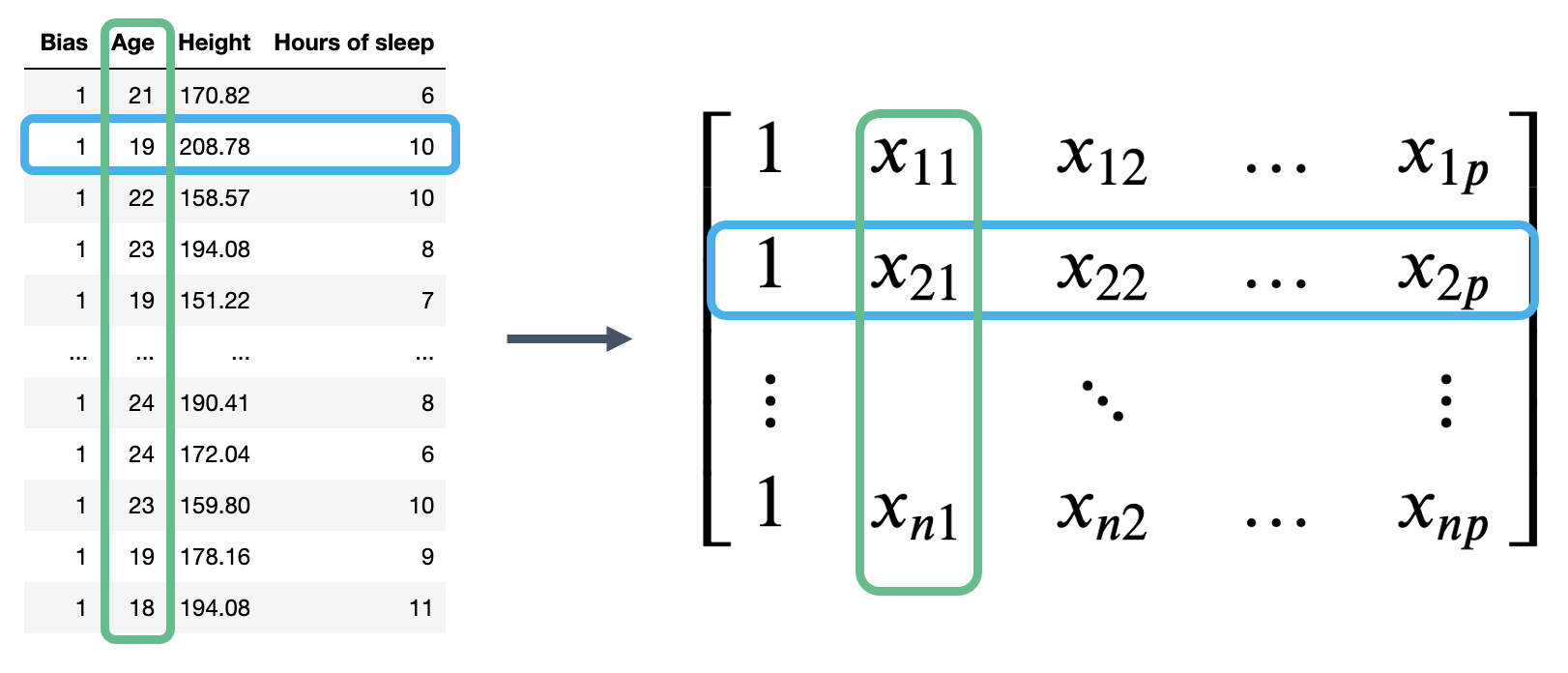
The matrix is known as the design matrix. It contains all observed data for each of our features, where each row corresponds to one observation, and each column corresponds to a feature. It often (but not always) contains an additional column of all ones to represent the intercept or bias column.
Our true output can also be represented as a vector, which we will call . As an example, our true output in the basketball example was the actual recorded PTS (5.1, 1.7, etc.). This is distinct from the predictions our model would make for based on our features (FG, AST, 3PA)
To review what is happening in the design matrix: each row represents a single observation. For example, a student in Data 100. Each column represents a feature. For example, the ages of students in Data 100. This convention allows us to easily transfer our previous work in DataFrames over to this new linear algebra perspective.
To summarize where we have ended up, our model now takes the form . is the prediction vector with elements (); it contains the prediction made by the model for each of the input observations. is the design matrix with dimensions , and is the parameter vector with dimensions . Our true output contains elements ().
Mean Squared Error
We now have a new approach to understanding models in terms of vectors and matrices. To accompany this new convention, we should update our understanding of risk functions and model fitting.
Recall our definition of MSE:
At its heart, the MSE is a measure of distance – it gives an indication of how “far away” the predictions are from the true values, on average.
We can express the MSE as a squared L2 norm if we rewrite it in terms of the prediction vector, , and true target vector, :
Here, the superscript 2 outside of the parentheses means that we are squaring the norm. If we plug in our linear model , we find the MSE cost function in vector notation:
Under the linear algebra perspective, our new task is to fit the optimal parameter vector such that the cost function is minimized. Equivalently, we wish to minimize the norm
We can restate this goal in three ways:
Minimize the mean squared error for the linear model
Minimize the distance between the vector of true values, , and the vector of predicted values,
Minimize the length of the residual vector, defined as:
A Note on Terminology for Multiple Linear Regression
There are several equivalent terms in the context of regression. The ones we use most often for this course are bolded.
can be called a
Feature(s)
Covariate(s)
Independent variable(s)
Explanatory variable(s)
Predictor(s)
Input(s)
Regressor(s)
can be called an
Output
Outcome
Response
Dependent variable
can be called a
Prediction
Predicted response
Estimated value
can be called a
Weight(s)
Parameter(s)
Coefficient(s)
can be called a
Estimator(s)
Optimal parameter(s)
A datapoint is also called an observation.
Geometric Derivation
Rethinking Matrix-Vector Multiplication
There are 2 ways we can think about matrix-vector multiplication
So far, we’ve thought of our model as horizontally stacked predictions per datapoint:
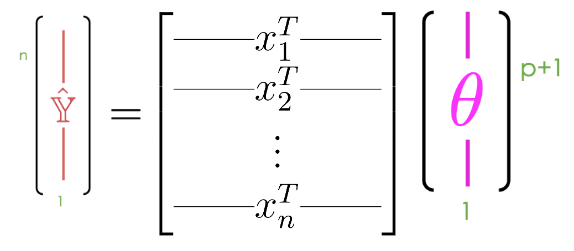
Notice that we can express our predictions in the following way:
Notice that the th element (zero-indexed) of every sum in the vector on the right side contains . So, the zeroth element of every sum contains , the second element of every sum (again, zero-indexed) contains , etc. It would be nice to group these elements with shared values together!
Because adding vectors of the same length produces a new vector of element-wise sums, we can split this already-summed vector into the sum of vectors:
Note that any th summed column vector contains exclusively elements of the form (except for the first one, which contains only elements of the form ). Thus, you can factor out from every -th summed column vector:
It is sometimes very helpful to think of matrix-vector multiplication as performed by columns. We can also think of as a linear combination of feature vectors, scaled by parameters.
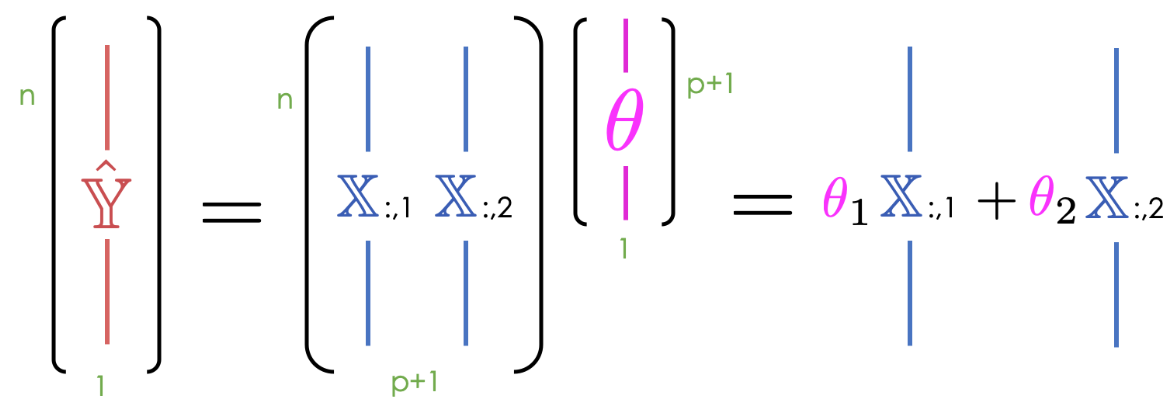
Up until now, we’ve mostly thought of our model as a scalar product between horizontally stacked observations and the parameter vector. We can also think of as a linear combination of feature vectors, scaled by the parameters. We use the notation to denote the th column of the design matrix.
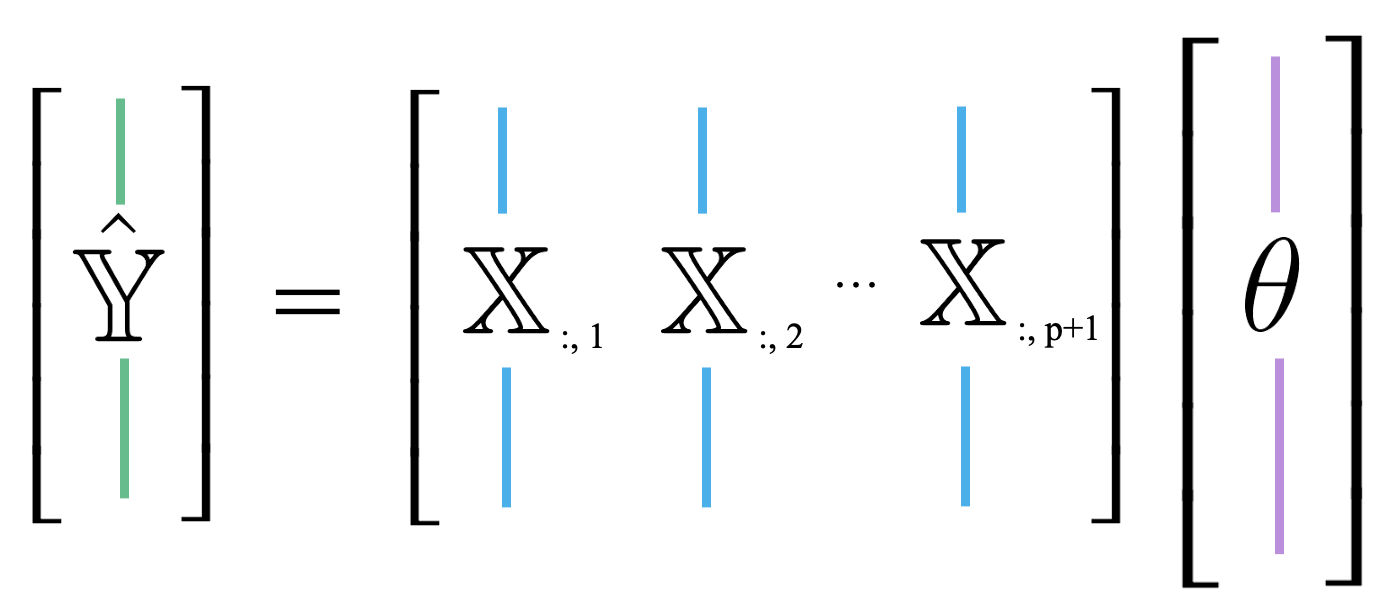
This new approach is useful because it allows us to take advantage of the properties of linear combinations.
Because the prediction vector, , is a linear combination of the columns of , we know that the predictions are contained in the span of . That is, we know that .
Column Space And The Normal Equation
The diagram below is a simplified view of , assuming that each column of has length . Notice that the columns of define a subspace of , where each point in the subspace can be reached by a linear combination of 's columns. The prediction vector lies somewhere in this subspace.
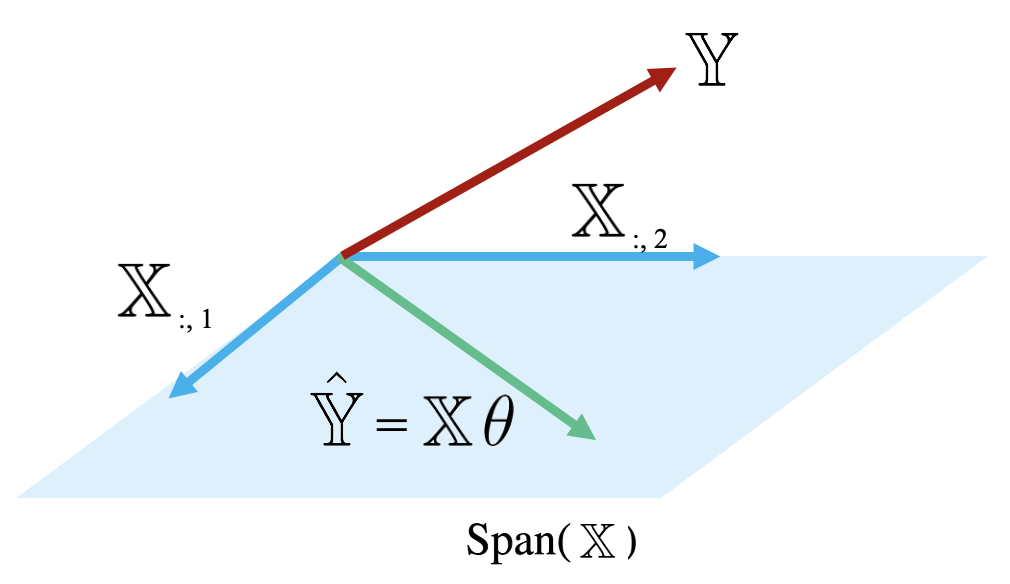
Examining this diagram, we find a problem. The vector of true values, , could theoretically lie anywhere in space – its exact location depends on the data we collect out in the real world. However, our multiple linear regression model can only make predictions in the subspace of spanned by . Remember the model fitting goal we established in the previous section: we want to generate predictions such that the distance between the vector of true values, , and the vector of predicted values, , is minimized. This means that we want to be the vector in that is closest to .
Another way of rephrasing this goal is to say that we wish to minimize the length of the residual vector , as measured by its norm.
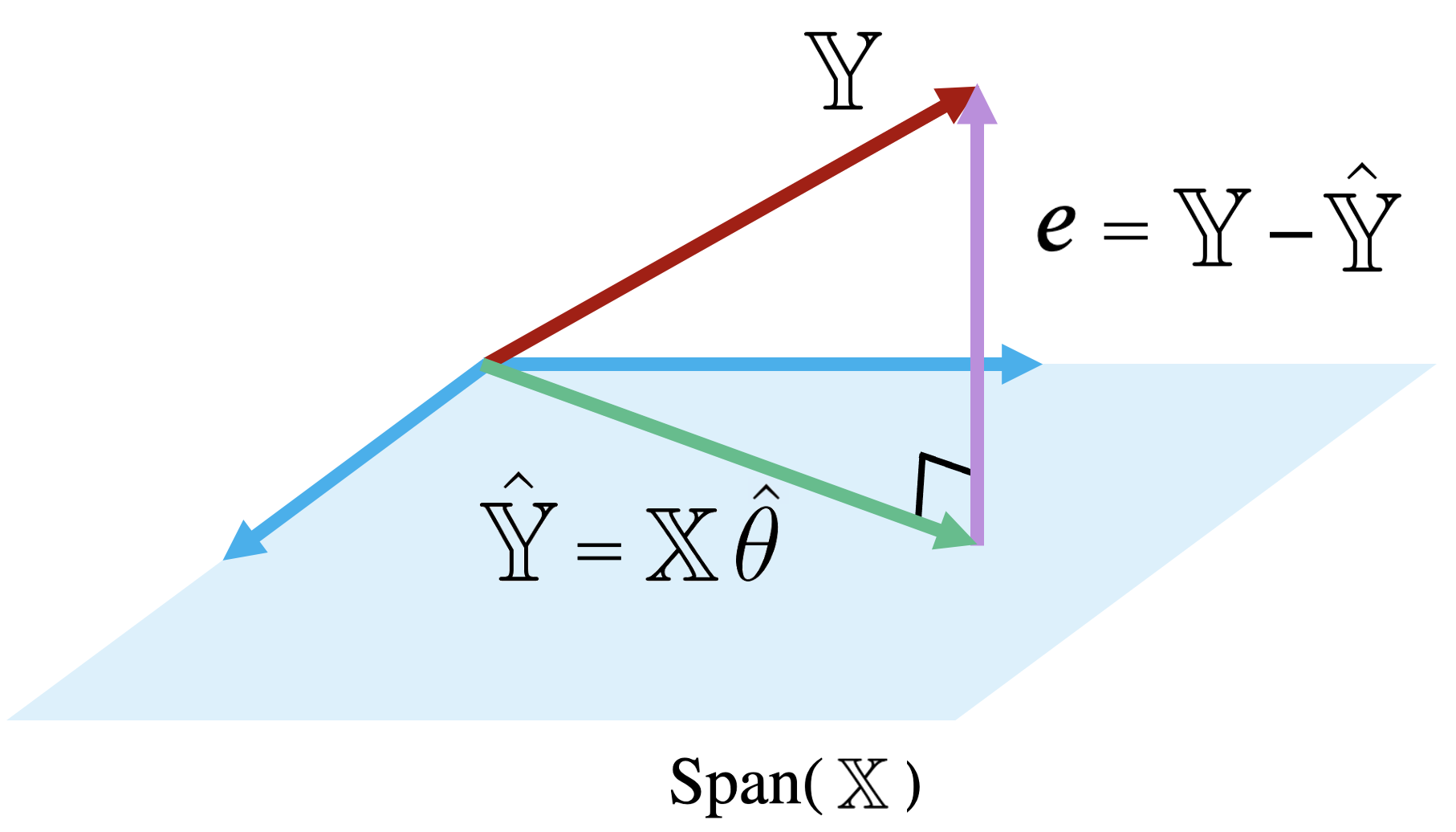
The vector in that is closest to is always the orthogonal projection of onto Thus, we should choose the parameter vector that makes the residual vector orthogonal to any vector in . You can visualize this as the vector created by dropping a perpendicular line from onto the span of .
Remember our goal is to find such that we minimize the objective function . Equivalently, this is the such that the residual vector is orthogonal to .
Looking at the definition of orthogonality of to , we can write:
Let’s then rearrange the terms:
And finally, we end up with the normal equation:
Any vector that minimizes MSE on a dataset must satisfy this equation.
If is invertible, we can conclude:
This is called the least squares estimate of : it is the value of that minimizes the squared loss.
Note that the least squares estimate was derived under the assumption that is invertible. This condition holds true when is full column rank, which, in turn, happens when is full column rank. We will get to the proof for why needs to be full column rank in the OLS Properties section.
OLS Properties
Residuals
When using the optimal parameter vector, our residuals are orthogonal to .
The Bias/Intercept Term
For all linear models with an intercept term, the sum of residuals is zero.
Existence of a Unique Solution
To summarize:
| Model | Estimate | Unique? | |
|---|---|---|---|
| Constant Model + MSE | Yes. Any set of values has a unique mean. | ||
| Constant Model + MAE | Yes, if odd. No, if even. Return the average of the middle 2 values. | ||
| Simple Linear Regression + MSE | Yes. Any set of non-constant values has a unique mean, SD, and correlation coefficient. | ||
| OLS (Linear Model + MSE) | Yes, if is full column rank (all columns are linearly independent, # of datapoints >>> # of features). |
Uniqueness of the OLS Solution
In most settings, the number of observations (n) is much greater than the number of features (p).
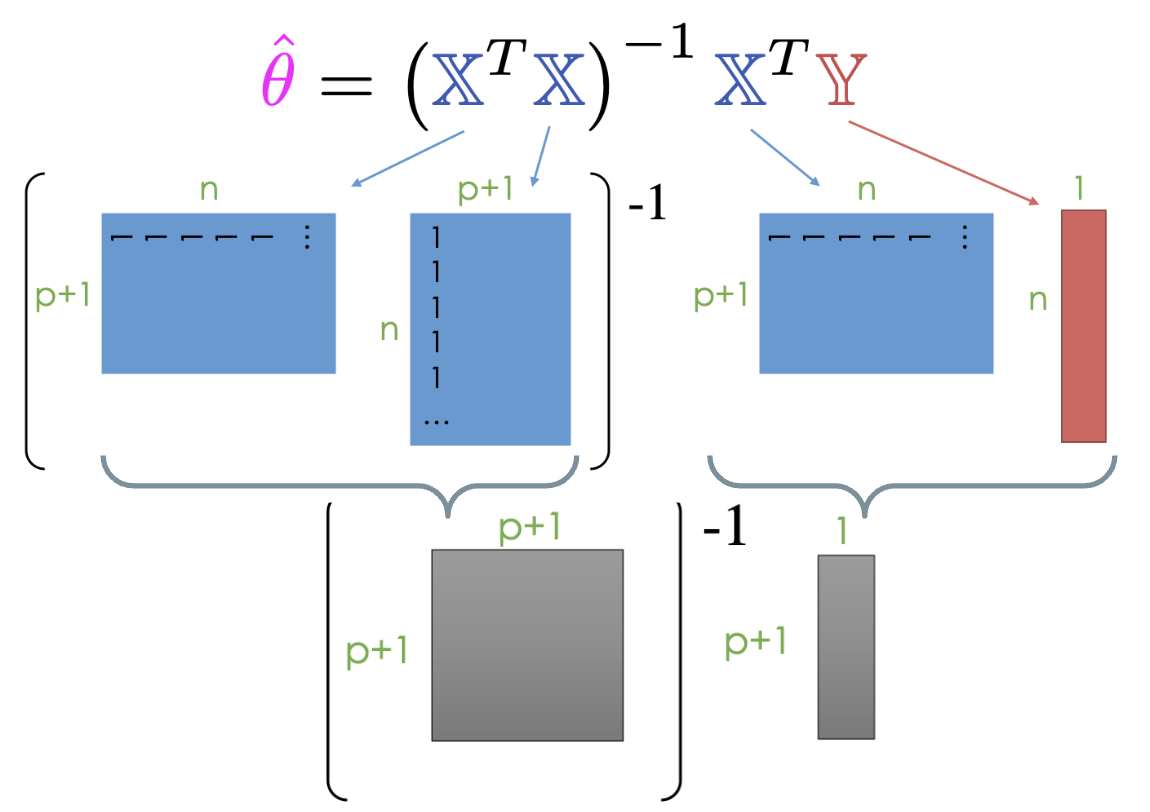
In practice, instead of directly inverting matrices, we can use more efficient numerical solvers to directly solve a system of linear equations using the normal equation shown below. Note that at least one solution always exists because intuitively, we can always draw a line of best fit for a given set of data, but there may be multiple lines that are “equally good”. (Formal proof is beyond this course.)
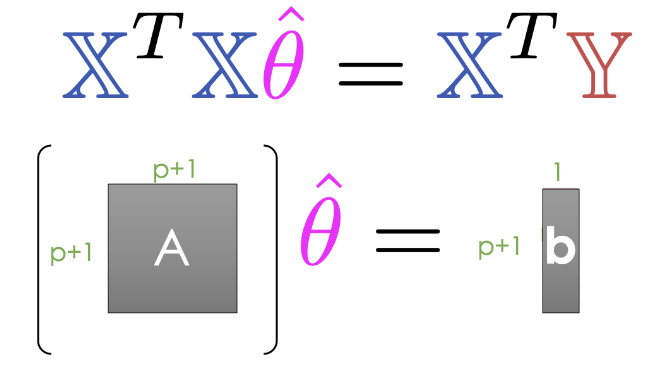
The Least Squares estimate is unique if and only if is full column rank.
Therefore, if is not full column rank, we will not have unique estimates. This can happen for two major reasons.
If our design matrix is “wide”:
If n < p, then we have way more features (columns) than observations (rows).
Then , so is not unique.
Intuition
With one data point (), there are SLR models () that minimize MSE. Try drawing a picture!
More intuition
Given two non-overlapping vectors () in 2D space () there is exactly one linear combination that can reach each point in 2D space.
If you have three of these vectors (), there are possible combinations.
Typically we have >> , so this is less of an issue.
If our design matrix has features that are linear combinations of other features:
By definition, rank of is number of linearly independent columns in .
Example: If “Width”, “Height”, and “Perimeter” are all columns,
Perimeter = 2 * Width + 2 * Height is not full rank.
Important with one-hot encoding (to discuss later).
Evaluating Model Performance
Our geometric view of multiple linear regression has taken us far! We have identified the optimal set of parameter values to minimize MSE in a model of multiple features. Now, we want to understand how well our fitted model performs.
RMSE
One measure of model performance is the Root Mean Squared Error, or RMSE. The RMSE is simply the square root of MSE. Taking the square root converts the value back into the original, non-squared units of , which is useful for understanding the model’s performance. A low RMSE indicates more “accurate” predictions – that there is a lower average loss across the dataset.
Multiple 
For SLR, we used the correlation coefficient to capture the association between the target variable and a single feature variable. In a multiple linear model setting, we will need a performance metric that can account for multiple features at once. Multiple , also called the coefficient of determination, is the proportion of variance of our fitted values (predictions) to our true values . It ranges from 0 to 1 and is effectively the proportion of variance in the observations that the model explains.
Note that for OLS with an intercept term, for example , is equal to the square of the correlation between and . On the other hand for SLR, is equal to , the correlation between and . The proof of these last two properties is out of scope for this course.
As we add more features, our fitted values tend to become closer and closer to our actual values. Thus, increases.
Returning to our basketball example:
The SLR model (AST only) explains 45.7% of the variance in the true .
The AST & 3PA model explains 60.9% of the variance in the true .
Adding more features doesn’t always mean our model is better, though! We’ll see why later in the course.
Demo: Predicting Penguin Bill Depth
Can we predict bill depth from flipper length and body mass? We can now apply what we have learned about Multiple Linear Regression models and Ordinary Least Squares to do just that. We will conclude by introducing the scikit-learn library for simple machine learning tasks, and using it to recreate the same prediction of bill depth.
Consider the penguins dataset.
# Load in the penguins dataset provided by seaborn package
df = pl.from_pandas(sns.load_dataset("penguins"))

# Filter to only include Adelie species and remove any rows with missing values.
# Remember that dropping rows with missing values should be done CAREFULLY.
# Here, we drop rows just so the demo modeling code runs without error.
df = df.filter(pl.col("species") == "Adelie").drop_nulls()

dfSuppose we could measure flippers and weight easily, but not bill dimensions. How can we predict bill depth from flipper length and/or body mass?
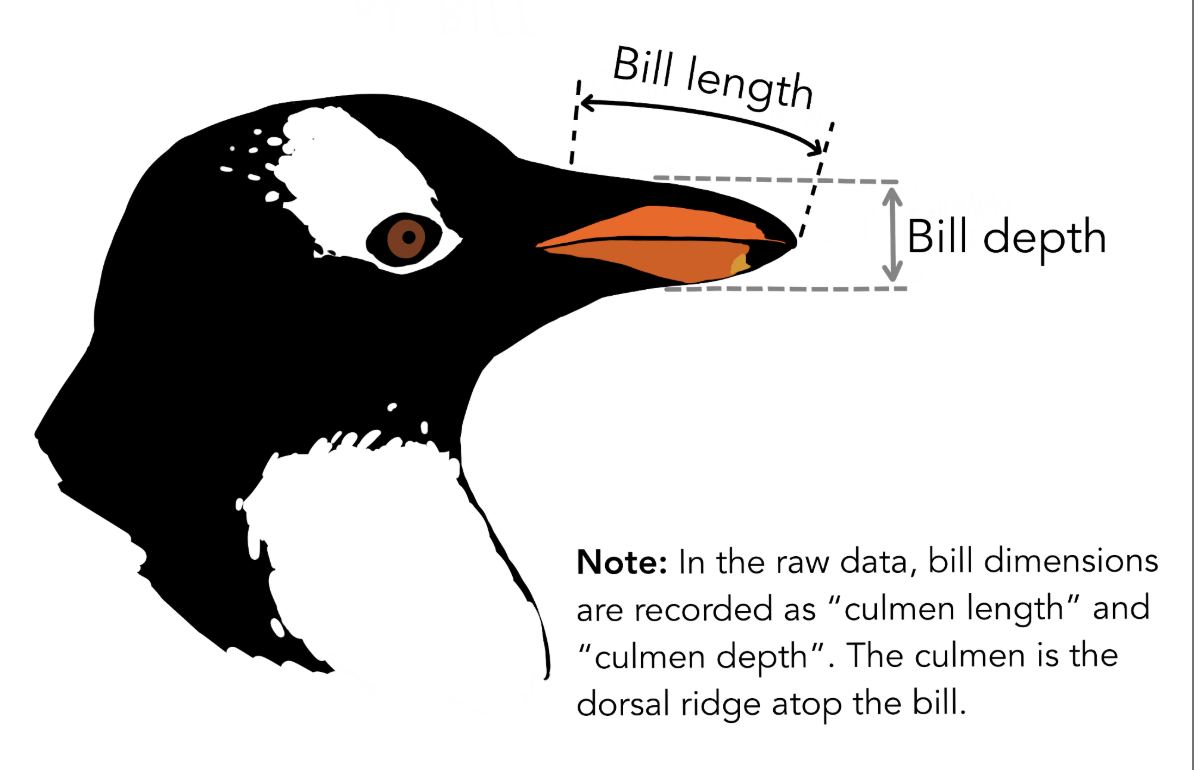
For demo purposes, we’ll drop all columns except the variables whose relationships we’re interested in modeling.
df = df.select("bill_depth_mm", "flipper_length_mm", "body_mass_g")

dfSuppose we want to create a linear regression model that predicts a penguin’s bill depth using both their flipper length and body mass , plus an intercept term.
Another way to write this:
Using The Solution To The Normal Equation
We saw in last lecture that we can model the above multiple linear regression equation using matrix multiplication:
The optimal that minimizes MSE also solves the normal equation:
If is full column rank, then there is a unique solution to :
Note: This derivation is one of the most challenging in the course, especially for those of you who are learning linear algebra during the same semester. Be kind to yourself!
Let’s try this in code. We have to add a bias column to the design matrix if we want to include an intercept in the model:
# Construct the design matrix X as a DataFrame and add a bias column
X = df.select("flipper_length_mm", "body_mass_g")

# Notice how using 1 (or pl.lit(1)) broadcasts a single value to all rows.
X = X.with_columns(bias=1)

# Let's put the bias column in front.
X = X.select("bias", "flipper_length_mm", "body_mass_g")

X# Construct the outcome vector y
y = df["bill_depth_mm"]
yRecall the solution to the normal equation if is full column rank:
# .to_numpy() hands the DataFrame and the outcome vector to NumPy as matrices
# M.T transposes a matrix M
# X @ Y multiplies matrices X and Y
# np.linalg.inv(M) finds the inverse of a matrix M
X_mat, y_vec = X.to_numpy(), y.to_numpy()
theta_using_normal_equation = np.linalg.inv(X_mat.T @ X_mat) @ X_mat.T @ y_vec

theta_using_normal_equation
array([1.10029953e+01, 9.82848689e-03, 1.47749591e-03])So, our fitted model is as follows:
Note: The code above is inefficient. We won’t go into this in Data 100, but it’s better to use np.linalg.solve rather than computing the explicit matrix inverse:
# Solves for θ in (XTX)θ = XTy (i.e., the normal equation) using a system of linear equations
np.linalg.solve(X_mat.T @ X_mat, X_mat.T @ y_vec)
array([1.10029953e+01, 9.82848689e-03, 1.47749591e-03])Make Predictions
We’ll save the predictions in a column so we can compare them against predictions from sklearn in the next section.
# Convert the DataFrame representation of the design matrix to a numpy array,
# and then multiply it by the theta vector to get the predicted outcomes.
# Yhat = Xθ
df = df.with_columns(
    pred_bill_depth_mm=pl.Series(X.to_numpy() @ theta_using_normal_equation)
)

dfMachine Learning Frameworks
We have introduced the Multiple Linear Regression model . We have expressed the Mean Squared Error loss function in vector notation:
We then used geometry to minimize average loss by fitting our model with optimal parameter values . We touched upon the use of matrix calculus to fit the model (out of scope for this course), and we used calculus to find the optimal parameter values for SLR in the previous chapters.
In research and industry, it is common to use libraries for creating and training models. In Data 100, we will use scikit-learn, commonly called sklearn.

The sklearn Workflow
At a high level, there are three steps to creating an sklearn model:
Initialize a new model instance.
Make a “copy” of the model template
my_model = lm.LinearRegression()Fit the model to the training data.
Save the optimal model parameters
my_model.fit(X, y)Use fitted models to make predictions.
my_model.predict(X_new)To extract the fitted model’s parameters, use my_model.coef_ (to extract parameters for all features without the bias ) and my_model.intercept_ (to extract the parameter for the bias ).
Let’s try this out.
Using sklearn to fit our Multiple Linear Regression Model
Do we obtain the same fitted OLS parameters provided by the normal equation using sklearn? We can use the sklearn workflow we just described to find out.
An alternate approach to optimize our model is to use the sklearn.linear_model.LinearRegression class.(Documentation)
# Import the LinearRegression class
from sklearn.linear_model import LinearRegression
Create an
sklearnobject.First we create a model. At this point the model has not been fit so it has no parameters.
# Construct a blank LinearRegression model object
model = LinearRegression()

modelfitthe object to data.
Then we “fit” the model, which means computing the parameters that minimize the loss function.
The first argument of the .fit method should be a matrix, or DataFrame, with dimension containing your feature data (the dimension is not because LinearRegression objects add an intercept by default). The second argument should be a vector, or Series, of dimension containing the observations we’re trying to predict.
Note: The LinearRegression class is hard-coded to use the MSE as its loss function.
# Fit the linear regression model to the data
model.fit(
    X=df.select("flipper_length_mm", "body_mass_g"),
    y=df["bill_depth_mm"]
)Analyze fit or call
predict.
Now that our model is trained, we can ask it questions.
The code below asks the model to estimate the bill depth (in mm) for three different penguins with different flipper lengths and body masses.
# Suppose we collected data from three new penguins:
new_penguins = pl.DataFrame({
    'flipper_length_mm': [185, 175, 145],
    'body_mass_g': [3750.0, 3550.0, 3250.0],
})
# Generate a prediction (yhat) by providing the X values to the model.

model.predict(new_penguins)
array([18.36187501, 17.96809096, 17.22998758])Here are the predictions for all of the penguins in our dataset:
model.predict(df.select("flipper_length_mm", "body_mass_g"))array([18.32256106, 18.44557829, 17.72141192, 17.99725413, 18.26326785,
18.13787407, 19.82684359, 17.5197668 , 18.49472072, 19.45001768,
18.28800021, 18.0169111 , 19.58793878, 17.72411076, 19.11520455,
17.73663808, 18.09110819, 18.47506375, 18.65737419, 18.38660737,
18.45540678, 18.04671885, 17.56890923, 17.34760713, 18.60823175,
17.55432765, 18.51469999, 17.72648731, 18.57367091, 17.83222412,
19.06098673, 18.70651662, 18.01723339, 17.6576879 , 19.68179284,
17.445892 , 18.68178426, 17.41133115, 19.4303607 , 17.25375308,
19.66688896, 17.85220338, 17.96776867, 19.01184429, 18.00232952,
19.20398322, 17.96776867, 18.95255108, 17.12566046, 18.34697113,
18.07620431, 18.5143777 , 16.99281474, 18.45033139, 17.47537746,
19.42053222, 18.14025062, 18.87392319, 17.0223002 , 18.7261736 ,
17.86916151, 18.90848404, 17.37677031, 19.52389247, 18.18939306,
18.63264183, 18.17448918, 19.07081521, 18.33714265, 19.19890783,
18.34697113, 18.57367091, 18.0860328 , 18.82953385, 17.58856621,
19.87360948, 18.45540678, 19.10537606, 17.82984757, 18.15483221,
18.48489224, 18.03181498, 18.69668814, 18.18939306, 18.2334601 ,
19.37106749, 17.84475144, 19.40595063, 17.71665882, 19.40055296,
18.33714265, 19.35648591, 17.03720408, 18.94779798, 18.39373702,
19.97934628, 17.3449083 , 19.1497654 , 17.22156878, 18.05654734,
18.49947382, 18.63264183, 17.47300091, 19.99425016, 18.60045753,
19.67671745, 17.62788015, 19.2555022 , 18.64247031, 18.95017453,
17.13548895, 18.53641122, 17.81019059, 17.77325319, 17.49503444,
18.12027136, 17.83016985, 18.71364627, 17.33745636, 18.8688478 ,
17.71903537, 19.27278263, 17.38659879, 18.97696116, 17.78308168,
18.11044287, 18.07112893, 19.57065836, 17.90134581, 18.63264183,
17.57128578, 18.84173889, 17.84475144, 19.17925086, 17.92337933,
17.97522061, 17.35711333, 18.37408004, 17.32255248, 18.21412542,
19.1497654 , 17.94573515, 18.0169111 , 18.4405029 , 18.30765719,
18.88850477])Let’s save the scikit-learn model predictions as a column in our DataFrame:
# Can also provide a design matrix or DataFrame to .predict()
df = df.with_columns(
    sklearn_preds=pl.Series(model.predict(df[["flipper_length_mm", "body_mass_g"]]))
)

dfLooking at the predictions above, we see that they are exactly the same as what we calculated with our analytic formula!
Analyze parameters.
We can ask the model for its intercept and slope with .intercept_ and .coef_, respectively.
# There is one intercept term in the model
# Why is this a scalar?
model.intercept_np.float64(11.002995277447068)# There are two slope terms in the model
# Why is this an array?
model.coef_array([0.00982849, 0.0014775 ])So, our fitted model is as follows:
The parameters are the same as with our analytic formula.
# vs. analytical solutions
theta_using_normal_equation
array([1.10029953e+01, 9.82848689e-03, 1.47749591e-03])They look the same!
Fitting General Models
The solution we found for the normal equation can only help us fit our model, or find our optimal parameters when we use Multiple Linear Regression as our model and Mean Squared Error as our loss function. How do these software packages, like scikit-learn, fit general models?
We made some big assumptions with the calculus-based and geometric techniques for minimizing loss:
Calculus:
We can’t always algebraically solve for the zero points of the derivative.
Geometric:
We don’t always use a linear model with MSE loss.
To design more complex models with different loss functions, we need a new optimization technique: gradient descent.
In the next chapter, we will use this iterative algorithm to numerically compute the parameters that minimize the loss.
[Bonus] Time Complexity of the Normal Equation
It can be easy to assume that a closed-form solution is always the fastest approach, but evaluating the normal equation on large datasets can be extremely computationally taxing and can take a lot of resources to calculate. Here we’ll explore why this is true.
We know that the solution to the normal equation is . Let’s break this down and determine the computational complexity for this solution.
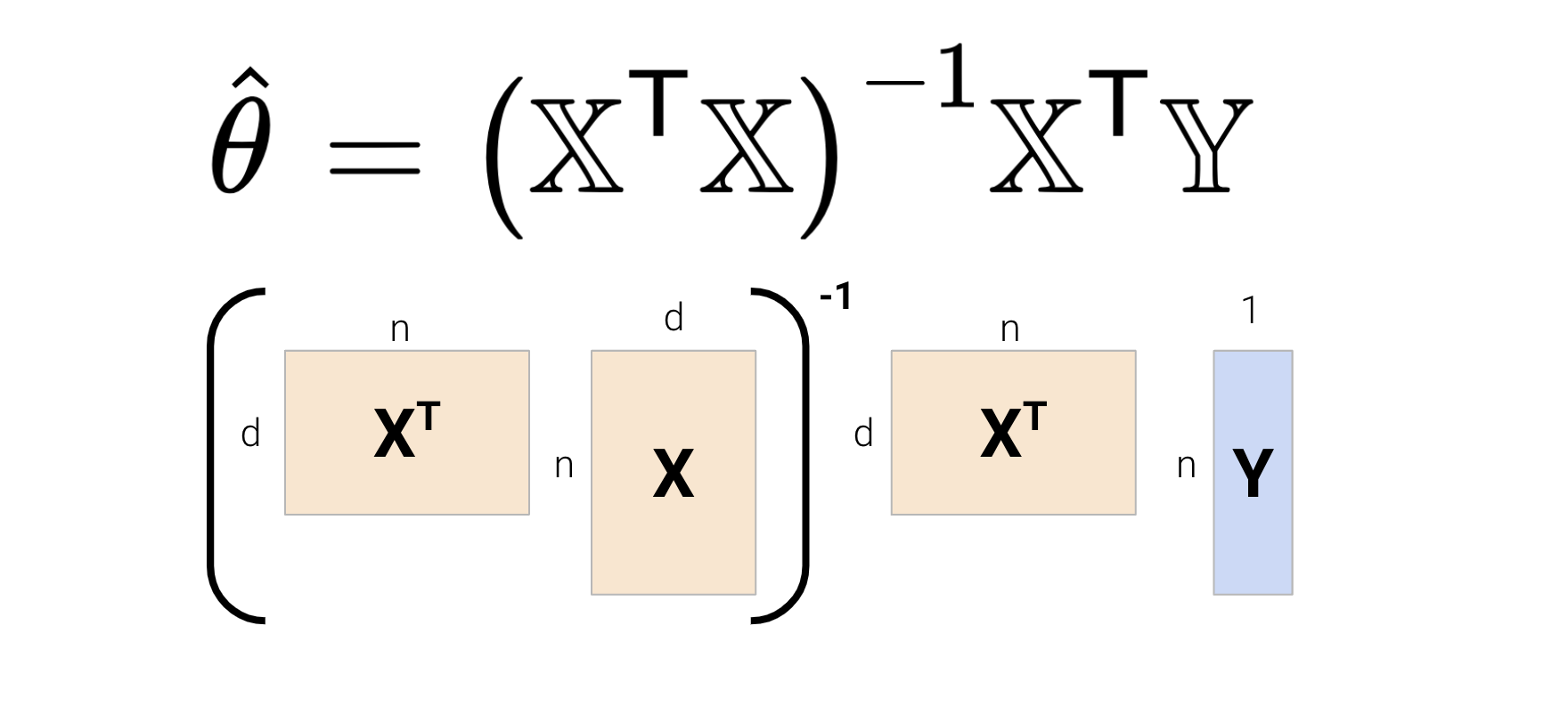
Let be the number of samples (rows) and be the number of features (columns).
Computing takes time, and it’s inverse takes another time to calculate; overall, takes time.
takes time.
Multiplying and takes time.
In total, calculating the solution to the normal equation takes time. We can see that dominates the complexity — this can be problematic for high-dimensional models and very large datasets.